
Screening ships by IMO number
In the individual check against sanctions lists you can also screen a ship by its IMO number. There is no separate input field for this: you simply enter the IMO number in the normal name field. The system recognises the IMO identifier automatically and specifically searches for ships listed on the sanctions lists under that IMO number.
Step by step
- Open the individual check against sanctions lists.
- Enter the IMO number in the “Name / Company to Check” field – the same field you normally use for names or companies.
- Use the format IMO + 7 digits. All common spellings are recognised equally:
IMO 1234567(with a space)IMO:1234567(with a colon)IMO-1234567(with a hyphen)IMO1234567(without a separator)
- Click “Check”.
- The system recognises the IMO identifier automatically and matches the number against the ship identifier in the sanctions lists. The result shows you whether a listed ship with that IMO number was found.
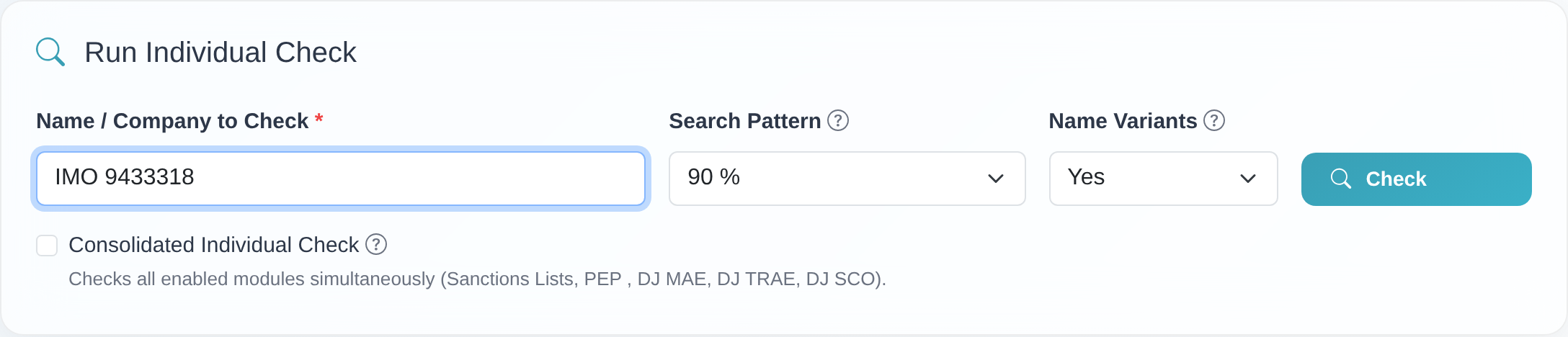 The IMO number is entered directly into the “Name / Company to Check” field – there is no dedicated IMO field.
Good to know
- Only a valid IMO identifier triggers the ship search. Valid means exclusively the pattern IMO + exactly 7 digits (with or without a separator between the prefix and the number).
- Without the “IMO” prefix, the entry is searched like a normal name. If you enter only the seven digits without the prefix, the system treats the input as an ordinary search term and does not run a dedicated ship search.
- Match against the ship identifier: for a valid IMO identifier, the system matches the number against the ship identifier stored in the sanctions lists.
- Minimum length of the name field: if the entry is too short, the message “The entered name is too short (minimum 4 characters without spaces).” appears. A complete IMO number (prefix + 7 digits) meets this minimum length.
- Data quality analysis: a plain, valid IMO identifier (prefix IMO + 7 digits) is not flagged in the data quality analysis – neither for the long sequence of digits nor as a “single-word name”.
Frequently asked questions
Is there a dedicated field for the IMO number? No. There is no separate IMO field. Simply enter the IMO number in the normal “Name / Company to Check” field of the individual check against sanctions lists.
How do I have to write the IMO number?
As the prefix IMO followed by exactly 7 digits. It does not matter whether you use a
space, a colon, a hyphen or no separator at all – IMO 1234567, IMO:1234567, IMO-1234567
and IMO1234567 are all recognised the same way.
What happens if I enter only the seven digits without “IMO”? Then your entry is treated like an ordinary name and no dedicated ship search takes place. The ship search is only triggered by a valid IMO identifier with the IMO prefix.
Is an IMO number reported as a problem in the data quality analysis? No. A plain, valid IMO identifier (prefix IMO + 7 digits) is not flagged in the data quality analysis.
Requirements
- The sanctions lists module is enabled for your access (the IMO search runs through the individual check against sanctions lists).
- The ship’s IMO number: the prefix IMO followed by exactly 7 digits.
Related articles
Last reviewed: