
Running a Dow Jones individual check (MAE, TRAE, SCO)
The Dow Jones individual check lets you screen a single name on the fly – a person or a company – against one of the three Dow Jones watchlists MAE, TRAE or SCO. You see the result on screen immediately: a red block for hits, a green block when nothing was found. You can then archive, print and optionally add the result to monitoring. The check works the same for all three modules – you simply choose the module you want beforehand in the menu.
Step by step
- In the left-hand menu, open the “Dow Jones” area and expand the module you want – “Dow Jones MAE”, “Dow Jones TRAE” or “Dow Jones SCO”. Below it, click “Run Individual Check”.
- In the “Name / Company to Check” field, enter the name. Enter the name only –
without titles, salutations or additions. Common legal-form abbreviations (GmbH, KG, OHG,
Ltd, Inc) are fine. For persons, use the format First Name Last Name.
- Not ideal:
Herr Max Mustermann,Dipl. Ing. Dr. Max Mustermann - Correct:
Max Mustermann,Musterfirma GmbH,Musterfirma Musterstadt GmbH
- Not ideal:
- If needed, under “Search Pattern” choose the required percentage of agreement
(e.g.
100 % (Exact match),90 %,80 %) or “Any Name Part”. The lower the percentage, the more similar spellings are found. - If needed, set “Name Variants” to “Yes” to also check reordered (permuted) versions of the name.
- Click “Check”. While the search runs, “Please wait…” appears briefly.
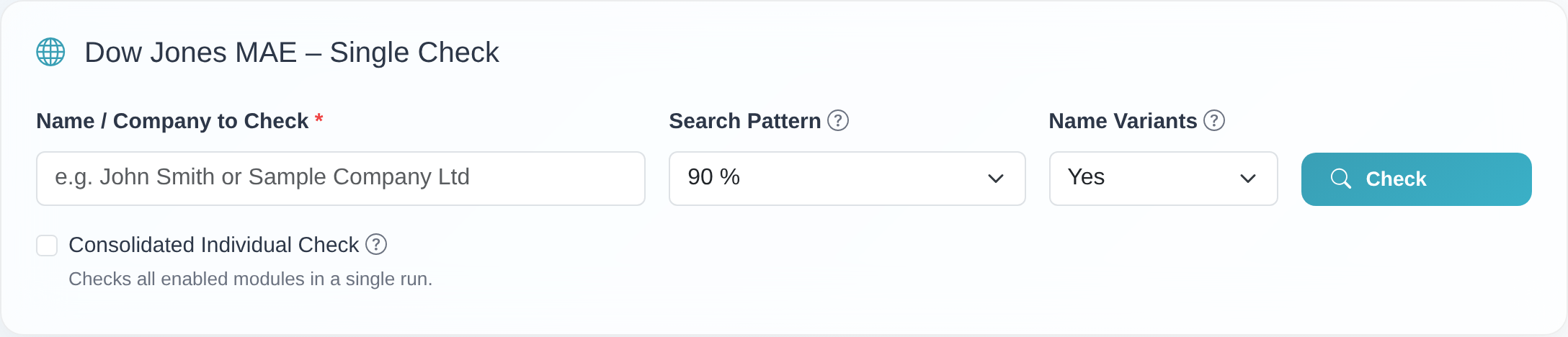 The Dow Jones individual-check search form with the “Name / Company to Check”, “Search Pattern” and “Name Variants” fields and the “Check” button.
- Read the result:
- Red block – “… – Hits Found!”: your search returned hits in the selected Dow Jones list. Each hit shows the percentage of agreement. Assess every hit on its merits before you make a decision.
- Green block – “No Hits Found”: your search returned no hits in the Dow Jones module you checked for the search pattern you chose.
- Keep the result: use “Print” or “PDF” to create a screening protocol. With “Archive Result” you store the result – optionally with “Your Reference” and “Comment” – in the archive. If “Add name to list screening?” is set to “Yes”, the name is also added to this module’s ongoing monitoring. See Archive a result & add to monitoring.
Good to know
- Three separate modules. MAE, TRAE and SCO are independent Dow Jones watchlists with additional compliance and risk data. Each module is enabled separately, has its own archive (e.g. “DJ MAE Archive”, “DJ TRAE Archive”, “DJ SCO Archive”) and its own monitoring. So a name checked and archived in “Dow Jones MAE” does not end up in the archive of “Dow Jones TRAE”.
- One module per check. The Dow Jones individual check screens the name against exactly the list whose module you opened in the menu. To check the same name in another module, use the “Run Another Individual Check” block after the check and pick the other Dow Jones module there (or sanctions lists / PEP).
- Consolidated check. If several modules are enabled, you can use the “Consolidated Individual Check” option to check all enabled modules in a single pass.
- Minimum length: if the name is shorter than 4 characters (excluding spaces), the message “The entered name is too short (minimum 4 characters without spaces).” appears.
- Search pattern
100 % (Exact match)returns only exact name matches; lower values are more tolerant of spelling differences. “Any Name Part” checks individual parts of the name. - Pre-filled name: if you open the Dow Jones individual check from a saved record or from the monitoring list, the name field is already filled in.
Frequently asked questions
What do MAE, TRAE and SCO stand for? They are three separate Dow Jones watchlists with additional compliance and risk data. Which of these lists you can check depends on which modules are enabled for your access. Our customer service is happy to clarify which lists make sense for you via the chat.
I don’t see the Dow Jones modules in the menu at all. Then no Dow Jones module is enabled for your access. If you still try to open a Dow Jones individual check, the message “This module is not enabled for your account.” appears. Contact customer service to have a module enabled.
Does one Dow Jones check screen all three lists (MAE, TRAE, SCO) at once? No. Each individual check runs against exactly one module – the one opened in the menu. For the other modules, start another check via “Run Another Individual Check” or use the “Consolidated Individual Check”.
Where do I find an archived Dow Jones result again? In the archive of the same module you checked in (e.g. “Archived Individual Checks” under “Dow Jones MAE”). Each module has its own archive.
My name is rejected as “too short”. The name must contain at least 4 characters excluding spaces. Enter a more meaningful or longer name.
How do I keep the result? Use “Print”/“PDF” for a protocol, or “Archive Result” to store it permanently and optionally add it to this module’s monitoring.
Requirements
- An access with the Dow Jones module you want to check enabled (Dow Jones MAE, Dow Jones TRAE or Dow Jones SCO). Each of the three modules is enabled separately. If a module is not active for your access, the message “This module is not enabled for your account.” appears.
- The name you check must be at least 4 characters long (excluding spaces).
Related articles
Last reviewed: