
Archiving a check result with reference and comment, and optionally adding it to monitoring
After every individual check you can store the result permanently in your archive – with your own reference and a comment. Optionally, you add the same name additionally to your running automatic monitoring. This article explains the save block below the result and the important difference between “Archive Result” and “Add name to list screening”.
Step by step
- Run an individual check. Below the result, the “Save Check” block appears with the note “Archive the result with an optional reference and comment.”.
- In the “Your Reference” (optional) field, enter a reference – e.g. a customer number or contract number (placeholder: “e.g. Customer Number, Contract Number”).
- In the “Comment” (optional) field, write your own note about the result (placeholder: “Your own comment on the check result”).
- At “Add name to list screening?”, decide whether the name should additionally be added
to your running monitoring:
- Yes – the name is added to the automatic list screening and continuously monitored.
- No – the result is only archived, without monitoring. The note below the block reads: “If \"Yes\", the name will be added to the automatic list screening and continuously monitored.”
- Only if you chose “Yes” does the “Duplicate detection” appear. Choose how an existing
entry should be recognised:
- None – no duplicate check, the name is always added.
- By name – an already monitored, identical name is not added again.
- By reference – an entry with the same reference counts as a duplicate.
- Click “Archive Result”.
- Read the confirmation at the top of the page: “Prüfergebnis archiviert.” (the result was
archived) with the “To Archive Overview” link. If you chose to add to monitoring, an
additional note appears below:
- added: “The name was imported into monitoring (list screening).”
- not added because of a duplicate: “The name was not imported into monitoring because a duplicate was detected.”
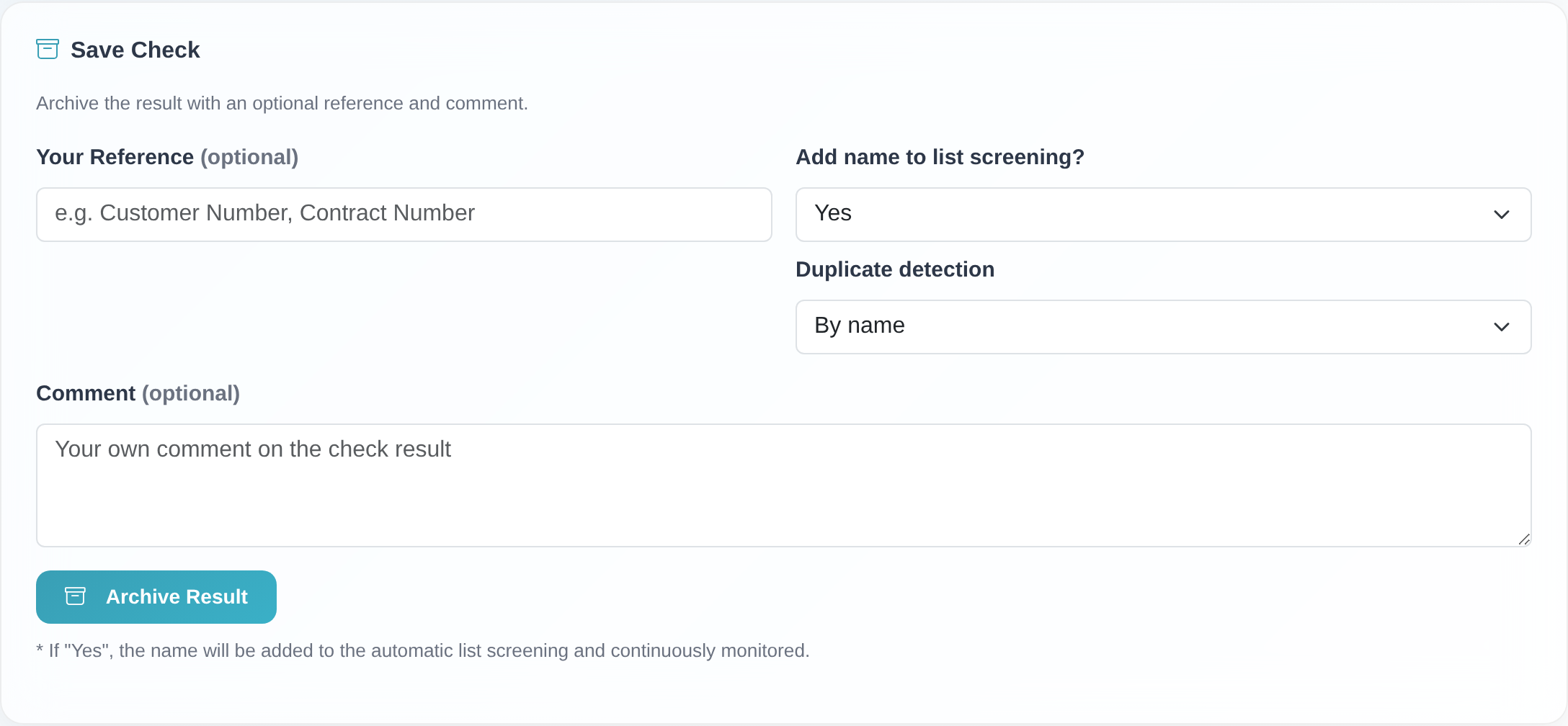 The save block below the result: reference, comment, the monitoring option and duplicate detection before clicking “Archive Result”.
Good to know
- Archiving and monitoring are two separate things. “Archive Result” stores the result only in the archive – a snapshot that you can later view, print or save as a PDF. With “Add name to list screening?” → Yes you add the name additionally to your running automatic monitoring, which from then on checks it regularly against the updated lists.
- Reference and comment are optional. Both fields are marked “(optional)”. A meaningful reference makes it easier to find the entry again in the archive later – and, with “Duplicate detection: By reference”, also drives the duplicate check in monitoring.
- Duplicate detection only applies when adding to monitoring. It controls solely whether the name is added to monitoring twice. It has no effect on the archive – the result is always stored there.
- Which search pattern applies in monitoring? Always the search pattern configured in your search options (menu Settings, “Suchoptionen” card) – not the percentage you chose for this single check. If the value of the single check differs, the save block shows the note “Note: monitoring uses the search pattern from your settings (…), not the value chosen for this single check (…).” when “Yes” is selected. If both values are equal, no note appears. The archive of the check keeps the value of the single check.
- Consolidated individual check: If you checked several modules at once, each module has its own archive block with “Archive:”, “Own Comment” and the “Archive check?” option. Use “Archive Selected Checks” to save all marked modules. The monitoring note then states per module what was imported or not imported because of a duplicate.
- If the monitoring option is missing: If you only see reference and comment but no “Add name to list screening?” option, adding to monitoring is not enabled for your access or plan. You can still archive.
Frequently asked questions
What is the difference between “Archive Result” and “Add name to list screening”? “Archive Result” only stores the result as an entry in the archive. “Add name to list screening? → Yes” additionally adds the name to the running automatic monitoring, which checks it continuously against the lists. You can use both independently of each other.
Do I have to enter a reference or a comment? No. Both fields are optional. A reference does help you find the entry again later – and is required if you choose “Duplicate detection: By reference” for monitoring.
What does the message “The name was not imported into monitoring because a duplicate was detected.” mean? A matching entry already exists in monitoring (depending on your choice, with the same name or the same reference). The name was therefore not added a second time. The result is still saved in the archive.
I ran the single check with 100% – will the name be monitored with 100% as well? No. Monitoring always uses the search pattern from your search options (e.g. 90%). The percentage of the single check applies to that one check only and is stored in the archive. If the two values differ, the save block points this out when “Yes” is selected.
Which duplicate detection should I choose? “By name” prevents the same name from being monitored twice. “By reference” is useful if you work with a unique reference per business partner. “None” always adds the name – even if it is already monitored.
I don’t see the “Add name to list screening?” option. Then adding to monitoring is not available for your access or plan (e.g. missing “View/Edit List” write permission or certain test/plan variants). Plain archiving still works. If you have any questions, please contact customer service.
Requirements
- A completed individual check (sanctions lists, PEP or Dow Jones). The save block only appears once a name has been checked.
- To add the name to monitoring: the “View/Edit List” permission (write permission). Without it, the “Add name to list screening?” option is not shown; plain archiving still works.
- With certain plans and on some test accounts, adding to monitoring is not available. In that case you only see the fields for archiving.
Related articles
- Individual check against sanctions lists
- View, print, export and delete archives
- What is monitoring – reading the overview
- Configuring search options: search pattern, name variants, duplicates and more
Last reviewed: