
Consolidated individual check: screening one name against all modules at once
With the consolidated individual check you screen a single name against all modules enabled for you (sanctions lists, PEP, Dow Jones) at the same time – in one pass instead of opening each module separately. You receive a separate result block for each module and can then archive the selected checks together.
Step by step
- In the customer portal, open the individual check (“Run individual check” menu item).
- Below the search form, tick the “Consolidated Individual Check” checkbox. The note underneath lists which modules are included (e.g. “Checks all enabled modules simultaneously (sanctions lists, PEP, DJ MAE).”).
- In the “Name / Company to Check” field, enter the name – without titles, salutations
or additions (e.g.
John SmithorSample Company Ltd). The name must be at least 4 characters long (without spaces). - If needed, choose “Search Pattern” and “Name Variants” (see Configuring search options).
- Click “Check”.
- Read the result per module: each checked module gets its own result block with the module name as the heading (e.g. “Sanctions list check”, “PEP check”, “Dow Jones MAE”). Each block shows either the list of hits or a note such as “No hits on sanctions lists.” or “No hits in the PEP database.”.
- For each module, in the “Archive:” area, optionally set:
- “Your Reference” – e.g. customer number or contract number.
- “Own Comment” – a note on the check result.
- “Add name to list screening?” – with “Yes” the name is added to that module’s ongoing monitoring (list screening), where available for the module.
- “Archive check?” – defaults to “Yes”; set it to “No” for any module you do not want to archive.
- At the bottom, click “Archive Selected Checks”. All modules with “Archive? = Yes” are saved; the message “The selected modules were archived.” confirms the action.
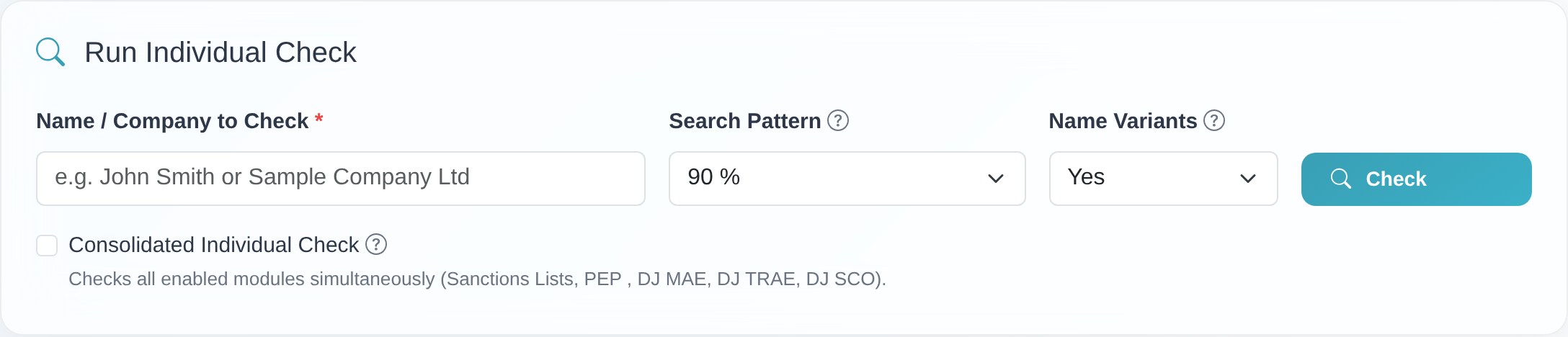 The “Consolidated Individual Check” checkbox below the search form – with the note listing which modules are included.
Good to know
- One consolidated protocol: Using the “Print” and “PDF” buttons in the “Protocol:” area, you create a single, cross-module print/PDF view of the result.
- Archived separately per module: Each module is stored in its own archive. You therefore set reference and comment separately for each module.
- List screening only where available: The “Add name to list screening?” option appears only for modules where monitoring is enabled. After archiving, a note reports which modules were added to monitoring or were not added because a duplicate was detected.
- Set as the default: You can make the consolidated individual check the permanent default in your search options, so the checkbox is already ticked when you open the individual check (see Configuring search options).
- Starting from the PEP or Dow Jones page: If you start a consolidated check on the PEP or a Dow Jones individual check page, the system automatically redirects you to the sanctions list individual check and combines all modules there. The name, search pattern and name variants are carried over.
Frequently asked questions
Why don’t I see the “Consolidated Individual Check” checkbox? The option only appears if more than one module is enabled for your customer and you are not using a test account. With a single module, a consolidated check is not needed. For questions about your enabled modules, please contact customer service.
Do I have to archive each module separately? No. For each module you only set “Archive check? = Yes/No” and then click “Archive Selected Checks” once. All selected modules are saved together.
Can I assign a different reference to each module? Yes. In each module’s “Archive:” block you enter its own “Your Reference” and its own “Own Comment”.
I started on the PEP page – why did I end up on the sanctions list page? That is intentional: the consolidated check always runs through the sanctions list individual check, because that is where all modules are combined. Your entries are carried over automatically.
How do I make the consolidated check the default? Enable it in your search options. After that, the checkbox is already ticked when you open the individual check. The steps are described in Configuring search options.
Requirements
- Several modules enabled: The option only appears if more than one module is active for your customer (e.g. sanctions lists and PEP, or additionally a Dow Jones module). Which modules are enabled depends on your plan.
- No test account: The consolidated individual check is not available in test accounts. If the option is not shown even though you use several modules, please contact customer service.
Related articles
- Running an individual check against sanctions lists
- Configuring search options: search pattern, name variants, duplicates and more
Last reviewed: