
Rating a hit as “false positive” or “positive”
When the automatic list screening finds one of your monitored records on a list, a hit is created. You rate every new hit as “False Positive” (it refers to a different person or organisation) or as “Confirm Positive” (the hit actually applies). A hit only counts as processed once it has been rated. This page shows step by step how to open, review and rate unreviewed hits – individually or in bulk.
How do I tell whether a hit is genuine?
In practice this is the hardest part of sanctions list screening – and nobody can make the decision for you. Not every hit is a genuine one. Often your business partner merely has the same or a similar name to a sanctioned person.
So open the hit content via "Details". It shows what the list holds about the sanctioned person – depending on the entry, for example:
- further names and aliases the person is listed under – if an alias rather than the first-listed name triggered the hit, this is shown right next to the match percentage: for PEP hits as “via alias …”, for sanctions lists and Dow Jones as “Matched name: …” with the marker “(match)” in the list of names
- date and place of birth
- passport or ID numbers
- addresses and country references
- functions and related persons (for PEP hits)
- the legal regulation the sanction is based on
Compare this against what you know about your business partner. If nothing but the name matches – different year of birth, different country, different function – that points to "False Positive". If several characteristics line up, treat the hit as "Positive".
Why you have to decide this yourself: your further measures depend on the rating. With a positive hit you must not supply goods and must not pay out funds – so you have to impose a delivery block, for instance. No software can draw that conclusion for you.
When in doubt, document. Record in the comment field why you decided as you did. In an official inspection or an audit, that is precisely the evidence that you met your duty of care.
Step by step
- Open the unreviewed hits. There are three ways to reach hit assessment:
- via the dashboard tile “Open hits (not yet rated)” of the module in question (click the red number);
- via the “Hits” button in the list overview (menu item “Overview”);
- directly via the menu item Monitoring → “Hits”. The page is headed “Automatic List Screening Hits”; a red badge “X unreviewed” shows the number of open hits.
- Review the hit. In the “Unreviewed Hits” section, each hit shows the name, the date (“Hit on …”), the “Reference:” if available and, under “Found on:”, the list. Click “Show hit details” to expand the detailed data of the matched entry; “Hide hit details” closes them again.
- Optionally add a comment. Under “Your comment” you can leave a note in the field “Reasons leading to the hit assessment (optional)” and store it with “Save comment”.
- Rate individually. Under “Hit assessment” there are two buttons:
- “False Positive” – the hit refers to a different person/organisation.
- “Confirm Positive” – the hit actually applies. The “Please confirm” dialog opens with the question “Do you want to mark as false positive this hit?” or “Do you want to confirm as positive this hit?”. Click “Confirm”. The message “Hit was marked as false positive.” or “Hit was confirmed as true positive.” then appears.
- Rate several hits at once (bulk selection). Tick the boxes of the hits you want on the left (or use “Select all” at the top) and use the “False Positive” or “Confirm Positive” button in the “Selection:” bar. After confirming, the system reports, for example, “3 hits marked as false positive.” or “3 hits confirmed as positive.”. If no hit is ticked, “Please select at least one hit.” appears.
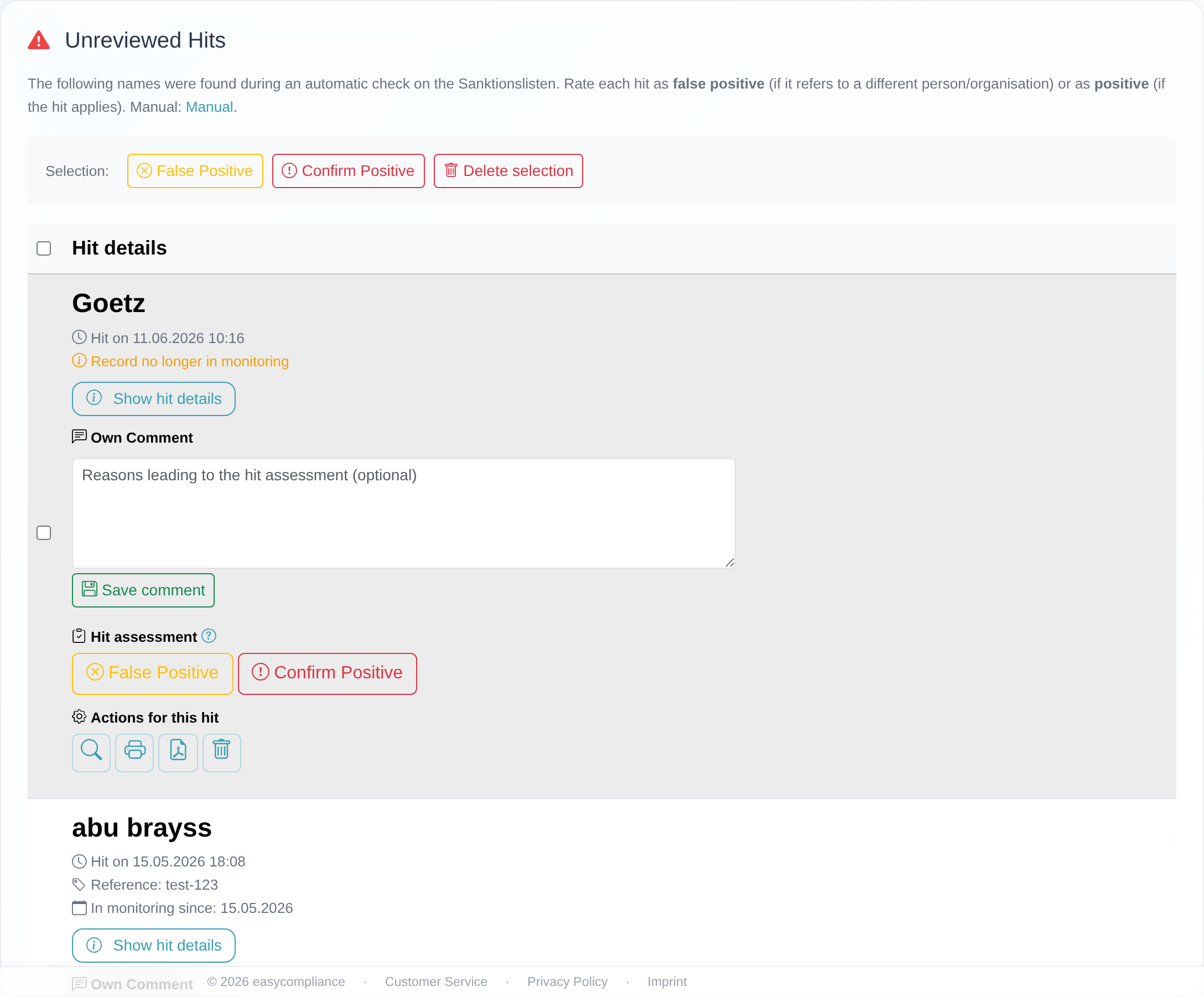 An unreviewed hit with expandable “hit details”, a comment field and the two assessment buttons “False Positive” and “Confirm Positive”.
Good to know
- What “false positive” means: The hit refers to a different person or organisation. Rated hits then appear in the “False positive rated hits” section. As the note there states: “They will no longer be reported as hits in future checks as long as the record remains on your list.” So as long as the underlying entry stays listed, the hit will not reappear.
- What “positive” means: The hit actually applies. Such hits move to the “Confirmed Hits (Positive)” section with the note “Please take the necessary compliance measures according to your internal guidelines.”.
- Module-neutral: Rating works identically for sanctions lists, PEP and Dow Jones. You can tell which module you are rating from the heading and the “– Monitoring” suffix in the breadcrumb.
- A rating can be undone: A rating can be reset later; the hit then has to be re-evaluated. How to do that is described in Undoing a rating or deleting a hit.
- “Record no longer in monitoring”: If this note appears on a hit, the related record has meanwhile been removed from your monitoring. You can still rate the hit.
Frequently asked questions
What is the difference between “false positive” and “positive”? Choose “false positive” if the hit refers to a different person or organisation – it is then no longer reported as long as the entry stays listed. Choose “positive” if the hit actually applies to your record; in that case take your compliance measures.
Will a name rated as “false positive” be reported again in future? No. According to the system note, false-positive-rated names “will no longer be reported as hits in future checks as long as the record remains on your list”.
Can I rate several hits at the same time? Yes. Tick the boxes of the hits you want (or use “Select all”) and click “False Positive” or “Confirm Positive” in the “Selection:” bar.
I cannot rate – the message “You have no permission to edit hits.” appears. Your access lacks the edit lists write permission. Ask the person responsible for your customer to adjust your permissions, or contact customer service.
Do I have to enter a comment before rating? No. The field “Reasons leading to the hit assessment (optional)” is optional.
Requirements
- The edit lists permission (write access). Accesses without write access can only view hits – trying to rate one shows the message “You have no permission to edit hits.”.
- At least one enabled module (sanctions lists, PEP or Dow Jones) with a monitored record for which a hit exists.
Related articles
- What is monitoring – reading the overview
- Undoing a rating or deleting a hit
- Understanding the dashboard
Last reviewed: